
I have viewing issues
If the website is not working properly or you are having problems streaming the videos, we recommend trying out the following steps:
- To access the website and view the free videos, you must be located in a country where our website is available. See also:
- Check that your device meets the system requirements. If your operating system and/or browser does not meet the requirements, please take appropriate action before proceeding. See also:
- If you are having problems with the website, please check that your internet browser is accepting 3rd party cookies. We use functional cookies in order to enable our website to work optimally. See also:
- If you are not able to play the subscription videos, please check that you are logged in and that your subscription is active. Try to play a free video under the Discover section. If the problem is also experienced with the free videos, try clearing your cache and cookies. See also:
- How do I know I am logged in?
- How do I know when my billing period will expire?
- Why and how to clear cache and cookies
- If you are having a problem with streaming of the videos, e.g. the videos keep buffering, your internet connection may not be fast enough. Try selecting a lower resolution while playing the videos. To check the speed of your internet connection, we suggest using Speedtest. See also:
- Try switching to a different browser
- Sometimes the use of mobile devices can lead to issues, depending on the version of your operating system and browser. Try switching to a PC or laptop to see if this solves your issue.
If you are still experiencing issues having gone through the above steps, you can contact Toolbox4all support via the below link.
I have issues subscribing
If you are not able to subscribe or have problems with accessing the subscription videos, we suggest you try the following:
- To subscribe you must reside in a country where we offer the subscription service, and you must have a payment method which is issued in this same country. See also:
- Check that the Toolbox4all website is working normally and that you are able to play a free video under the Discover category. If this is not working then you may be having a technical problem. Before proceeding go to:
- Before subscribing you must register a membership and log in to your membership account. This requires a valid email address which has not previously been used for registering with Toolbox4all. If you have an existing registration with Toolbox4all you may use the associated email address to log in.
- If you get an error message on the Stripe payment page, or your payment fails, this may have one of several reasons. See also:
- The charge may be pending. If your billing statement doesn’t indicate that the charge went through successfully yet, it’s possible that the charge is still awaiting authorisation. In this case, if the charge doesn’t go through successfully, it will eventually clear from your billing statement.
- Your payment method may have failed. If Stripe isn’t able to charge your payment method successfully, then your subscription won’t go through, and you’ll need to try making the payment again.
If you are still experiencing issues having gone through the above steps, you can contact Toolbox4all support via the below link.
I have issues with my account
If you are not able to access the subscription videos when you have registered a membership and have an active subscription in place, we suggest you try the following :
- Check that the website is working normally and that you are able to play a free video under the Discover category. If this is not working then you may be having a technical problem. Before proceeding go to:
- Is it possible that you registered under a different email account? In order to access the videos, you must be logged in using the same email as you used when subscribing.
- Check that the subscription period is still active. Select the Log in tab, log in and then select the Account tab. The account Status should be either “Active” or “Cancelled (Active until date)” in order to be able to watch the videos. See also:
- Sometimes subscribing through mobile devices can lead to issues, depending on the version of your operating system and browser. Try switching to a PC or laptop to see if this solves your issue.
If you are still experiencing issues having gone through the above steps, you can contact Toolbox4all support via the below link.
Access Content
Is using Toolbox4all secure?
Toolbox4all is committed to protecting your privacy and handling your information in a secure and confidential manner. Please read our Privacy Statement for more details.
All transaction data associated with the subscription service are managed by Stripe, who use best-in-class security tools and practices to maintain a high level of security. Please refer to Stripe.com for more details.
Geographic availability
Our website is available in most western world countries, as listed in the table below.
| Australia | Latvia |
| Austria | Lichtenstein |
| Belgium | Lithuania |
| Bulgaria | Luxembourg |
| Canada | Malta |
| Croatia | Netherlands |
| Republic of Cyprus | Norway |
| Czech Republic | New Zealand |
| Denmark | Poland |
| Estonia | Portugal |
| Finland | Romania |
| France | Slovakia |
| Germany | Slovenia |
| Greece | Spain |
| Hungary | Sweden |
| Iceland | Switzerland |
| Ireland | Ukraine |
| Italy | United Kingdom |
Our subscription service is not yet supported in all countries, but we are currently working on extending the coverage. If you join our membership service, we will notify you when support is extended to your country.
Can I watch the subscription videos even if I am out of the country?
Yes you can!
You should primarily access the subscription service contents from within your country of residence. On a temporary basis you may access this contents from outside your country, as long as you stay within the geographic area where our website is available.
See also:
Can I watch from different devices at the same time?
Yes you can!
You can log in on your various devices and switch between them to suit your needs.
How do I activate landscape mode on my mobile device?
Turn on auto rotate by following the below instructions, and then turn your mobile device sideways.
For Android:
- Swipe down from the top of the screen to open the Quick settings panel.
- Look for the screen orientation icon
- If the screen is locked in Portrait or Landscape mode and you need to change it, tap the icon (either Portrait or Landscape) so it activates Auto rotate
For iOS
- Swipe down from the top-right corner of your screen to open Control Center.
- Tap the Portrait Orientation Lock button to make sure that it’s off.
What are system requirements?
To ensure that the Toolbox4all website, streaming and other services are working optimally, you will need a “Toolbox4all Device”.
The definition of a Toolbox4all Device is a PC, laptop, tablet or smartphone; which utilises a Windows, MAC, Android or iOS operating system; and which utilises an Edge, Safari, Chrome or Firefox browser.
It is a requirement to keep both your operating system and browser up-to-date. A device using an operating system version that is no longer supported by Microsoft or Apple, is not considered a Toolbox4all Device.
If you are unsure of the operating system version you have installed, you can find out how to check this using one of the following links:
What are streaming requirements and how do I adjust these?
As the videos are full HD quality, streaming the videos require a substantial amount of data traffic. For optimal quality playback an internet connection with at least 7 Mbps is required, although low resolution SD may work with connections down to some 1 Mbps.
The videos are set to automatically play at an optimal streaming rate based on the device you are using. However, if you are experiencing that the videos are buffering due to a slow internet connection, or you want to limit the data charges from your GSM network, the video resolution can be manually reduced.
To do this, start playing a video. Stop the video once it has loaded. Select the cog wheel at the lower right of the screen and select a lower resolution. Restart playing the video. Note this needs to be performed each time a video is played.

Why and how to clear cache and cookies
Some video issues may be caused by extensions, plugins, stored cache, or browser data. We recommend clearing the cache and cookies of your browser to fix this.
This works slightly differently for different devices, operating systems and browsers. Irrespective, you need to make sure you select cache and cookies and delete them for all times.
If you are unsure how to clear your cache and cookies, you can find out how to do this using the links given in the below table.
| Operating System | Browser | Link |
| Windows | Edge Chrome Firefox | Delete cache and cookies in the new Microsoft Edge Clear cache & cookies Delete browsing, search and download history on Firefox |
| Mac OS | Safari Chrome Firefox | Clear your browsing history in Safari on Mac Clear cache & cookies Clear browsing history in Firefox for iOS |
| Android | Edge Chrome Firefox | Microsoft Edge app help Clear cache & cookies Clear your browsing history and other personal data on Firefox for Android |
| iPad OS | Safari Chrome Firefox | Clear the history and cookies from Safari on your iPhone, iPad, or iPod touch Clear cache & cookies Clear browsing history in Firefox for iOS |
How to enable third-party cookies on my browser
Cookies are small pieces of data used by a website to remember information about the user. This allows a website to show relevant content to the user over time. Without them, browsing a website can be a frustrating experience and some may even be difficult to navigate.
To make it easier for you to browse the Toolbox4all website, we recommend enabling third-party cookies on your browser. If you are unsure how to enable third party cookies, you can search on the articles using the websites to which links are provided in the table.
| Operating System | Browser | Link |
| Windows | Edge Chrome Firefox | Allow or Block Cookies in the new Microsoft Edge Turn cookies on or off Third-party cookies and Firefox tracking protection |
| Mac OS | Safari Chrome Firefox | Block cookies Turn cookies on or off Third-party cookies and Firefox tracking protection |
| Android | Edge Chrome Firefox | Allow or Block Cookies in the new Microsoft Edge Turn cookies on or off Third-party cookies and Firefox tracking protection |
| iPad OS | Safari Chrome Firefox | Clear the history and cookies from Safari on your iPhone, iPad, or iPod touch Turn cookies on or off Third-party cookies and Firefox tracking protection |
Subscribe & Pay
What should I do as a new user?
As a new user you may freely access all parts of the website and view all videos under the Discover category. To view videos under either the Maintain or Renovate categories, requires that you:
- Register a Membership with Toolbox4all
- Log in to your Membership account
- Subscribe to the subscription service
See also
Why do I get an error message when I try to register a Membership?
If your email address is known by Toolbox4all (i.e. you have registered your email address with us on a previous occasion), you will get an error message. In this case you should log in. If you cannot remember your password, you can request a new password.
See also
Which payment methods are accepted?
We currently accept the following payment methods:
- Master Card
- Visa
- American Express
- Diners Club
- Discover
- JCB
- Union Pay
Note your payment method must be issued in your country of residence.
Why do I get an error message when I try to pay?
If you get an error message on the Stripe payment page, this may have one of several reasons:
- Your entered “Card information” is not correct
- Your entry under “Country or region” does not match your country of residence
- Your payment method has not been issued in your country of residence
- Your payment may have failed
See also
My payment did not go through. What can I do?
The charge may be pending. If your billing statement doesn’t indicate that the charge went through successfully yet, it’s possible that the charge is still awaiting authorisation. In this case, if the charge doesn’t go through successfully, it will eventually clear from your billing statement.
Your payment method may have failed. If Stripe aren’t able to charge your payment method successfully, then your subscription won’t go through, and you’ll need to try making the payment again.
Where do I find my receipt?
A receipt will be sent to your email address when you subscribe, as well as each time your subscription is renewed
If you do not see the receipt in your inbox, please check your junk email folder.
Will the subscription automatically renew and charge my card?
Yes, your subscription will automatically renew.
If you want to cancel your subscription you may do so at any time. After cancellation, the videos may still be viewed until the end of the current billing period.
See also
I have my own business. Can I receive a VAT invoice?
No this is not possible. We currently do not support the issue of VAT invoices.
Can I request a refund?
No this is not possible. Payments which are made to Stripe are final and non-refundable. Notwithstanding the foregoing, Toolbox4all may, in its sole discretion, make refunds if it determines that the circumstances warrant a refund.
Manage Account
How do I access my membership account?
To access your account, you need to be logged in. Select the Log in tab at the top of the screen to open the Log in page. Under Log in, fill in your email address and password used for registering you Membership. Once you are logged in, the Log in tab will be replaced by the Account tab.
How do I know I am logged in?
If you are logged in, the Log in tab at the top of the screen will be replaced with the Account tab.
Do I have to log in each time I open the website?
No, you do not!
If you select Remember Me during log in, you will stay logged in. If you change device or browser you will have to log in again, but also here you may select Remember Me to stay logged in.
Note if you are using a public device, you should always log out to prevent others getting access to your account.
Why and how to log out of my account?
if you are using a public device, you must log out after each use to avoid other people accessing your account.
To do this, go to the Account page and select the Log out button.
How do I know when my billing period will expire?
The date when your current billing period will expire, can be found on the Account page.
How do I cancel or renew my subscription?
Your subscription may easily be turned on and off to suit your needs.
To cancel your subscription, go to the Account page. press Select Action and then select Cancel. Your Account Status will immediately change from ”Active” to “Cancelled (Active until date)”. Until this date you will be able to keep viewing all videos, but your subscription will no longer renew.
To renew your subscription, go to the Account page and subscribe. This works the same as the first time you subscribed.
Note to renew your subscription, the billing period must be expired so that the Account Status is “Cancelled”.
See also:
How do I update my payment method?
If you want to change or update the details of your payment method, you need to cancel your subscription, wait until your billing period has expired, and then renew your subscription. When requested to pay for the new subscription you may enter your new payment method data.
Note you new payment method must be issued in your country of residence.
How do I change my email address?
It is not possible to change the email address associated with a membership account.
Instead you will have to register a new membership using your new email address. Your old membership account will eventually be deleted by us when unused, or you can request us to delete it.
See also:
I have forgotten my log in password
If you can’t remember your password, an option exists during log in to request a new password.
Select the Log in tab to go to the Log in page. Under Log in enter the email address you used to register your membership with Toolbox4all. Select Request a new password and we will email you instructions for resetting your password.
I can’t remember the email address used for registering
If you think you need help accessing your membership account, let us know and we can help out.
What should I do if I move residence to another country?
If you move residence to another country where we support the subscription service, you should cancel your subscription, wait until your billing period has expired, and then subscribe again, so that your location and payment method may be updated.
If you move residence to a country where we do not support the subscription service, you are not allowed to make use of this service any more and you should cancel your subscription.
If you move residence to a country where the website is not supported, you should cancel your subscription before moving, as you will not be able to access the website and your account from the new location.
Note when you change your country of residence you must also change your payment method, as this must be issued in your country of residence for the subscription service to work.
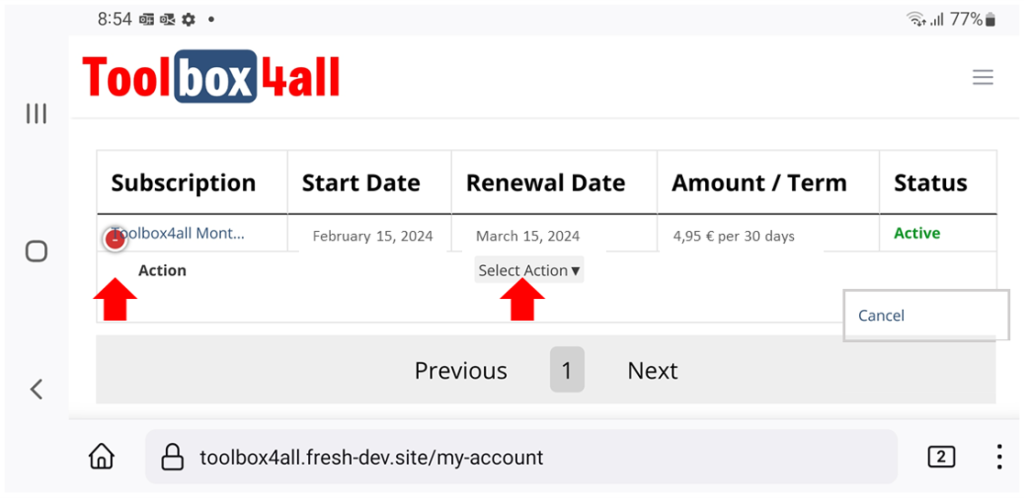
Why can’t I see the full Account page on my mobile device?
If you are using a mobile device you may have to put this into landscape mode to be able to view the full Account page.
Furthermore, the Select Action button may be toggled on and off by pressing the coloured dot, which is visible when the account status is “Active”.
See also
Someone may have gained access to my membership account. What should I do?
If you become aware of unauthorised access to your account, please change your password and notify us immediately.
Note if you are logged in and need to change your password, select Log out in your Account page, select the Log in tab to go to the Log in page. Enter your email and select Request a new password.
My membership account has stopped working
If your membership account remains unused for more than a number of years, we will delete it. We do this for privacy reasons. If this has happened, you merely need to re-register your membership account using your existing email.
How do I delete my membership account?
If your account remains unused for more than a number of years, we will delete it. It is not possible to delete an account via the website. Should you wish us to delete your account you may contact us and request this.
Note we do not provide refunds or credits for any partial remaining subscription period at the time of deletion, so we recommend to request deletion after your billing period has expired.